DC++ for Mac
The original DC++ application is for Windows. To connect from a Mac, you need another client that speaks the Direct Connect protocols.
TigerDC++ is our native Mac client for hubs, search, sharing and downloads. It runs on Apple Silicon with macOS 26 or later. This guide also covers other options if you use an older Mac or prefer Terminal.
By Pinemoon Studios, the maker of TigerDC++. Checked 5 October 2026.
Choose a client for your setup
| Client | How you use it | What to check |
|---|---|---|
| TigerDC++ | Native Mac application. Download a DMG. | Apple Silicon, macOS 26+. A 24-hour trial, then €19 once. No Intel build. |
| EiskaltDC++ | Open-source desktop client available through MacPorts. | Install MacPorts first and check its current requirements for your macOS version. |
| ncdc | Text interface in Terminal, available through Homebrew. | Suitable if you prefer keyboard commands. Check Homebrew’s packages for your Mac. |
| AirDC++ Web Client | A browser interface to a client running on a supported computer or server. | Its official site currently says there is no macOS version. Browser access is different from running the client on your Mac. |
Links above go to the projects or their package listings. Availability is based on those sources; we have not tested every client on every macOS release.
Search and download in one window
TigerDC++ searches connected hubs, combines sources for the same file and keeps your queue organized into folders. The lower transfer panel lets you watch downloads while browsing results. Quick Look and Finder actions fit the rest of your Mac workflow.
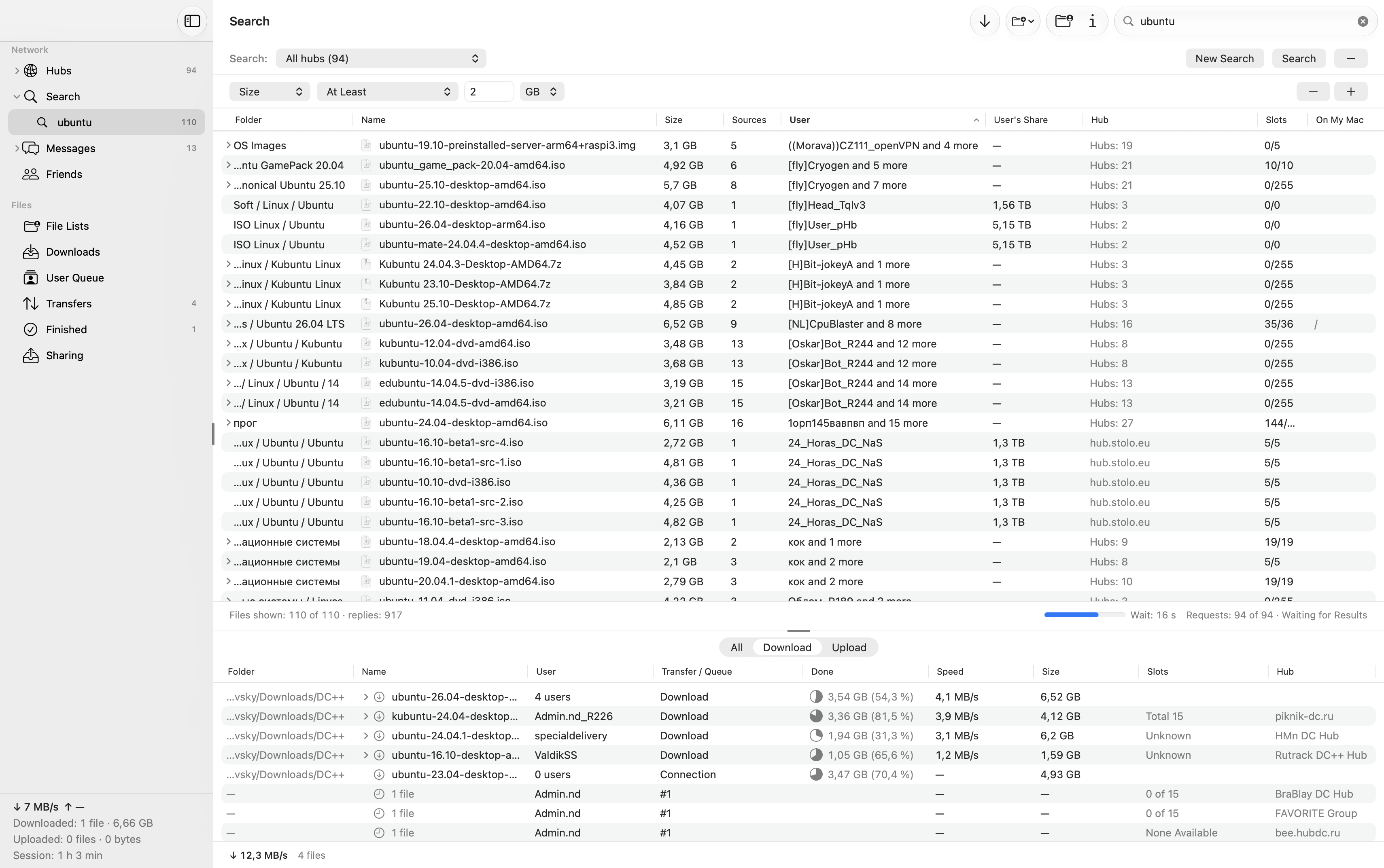
All features are available for 24 hours. A €19 license covers two personal Macs and all 1.x updates; taxes appear at checkout. Paid licenses need an online check at least every seven days. Read the license details.
This build is not Apple-notarized. macOS may block its first launch; our installation guide explains the warning and the steps to open the app.
Connect to your first hub
- Install and start the trial.
Move TigerDC++ from the DMG to Applications and open it. The setup guide covers first launch and activation.
- Choose a hub.
Open Hubs and connect to a community you know, or use the address supplied by its administrator. A private hub may need an account or password.
- Check the hub’s sharing rules.
Some hubs require a minimum share. Choose the folders you intend to make available in Sharing, and allow their files to be indexed before expecting the hub to accept the share.
- Search for a file.
Open Search and choose the connected hubs to search. Select a result to download, then follow its progress in Downloads or the lower transfer panel.
Direct Connect searches the users connected to your selected hubs. It is not a search of the whole internet. Results and transfer availability depend on those users being online and offering upload slots.
Common questions
Will TigerDC++ run on an Intel Mac?
No. The current build requires Apple Silicon and macOS 26 or later. Check the EiskaltDC++ and ncdc package links above for options that match your hardware and operating system.
Does a macOS warning mean my current client is broken?
Not necessarily. A warning that Apple cannot verify an app is different from a crash or a connection problem. TigerDC++ can show that warning too. Read the exact message and follow the app developer’s installation instructions.
Why does a connected hub return no results?
Check which hubs are selected, the search terms and any size or type filters. A hub can restrict searches until its share or account requirements are met. Its status and messages can explain the restriction.
Can I try TigerDC++ without moving my existing queue?
Yes. Keep your current client’s settings and unfinished downloads, and choose a separate download folder for your trial. Avoid having two clients write to the same incomplete files. Test the hubs and workflow you use before moving your downloads.